Percent Increase Calculator — Find Percentage Growth Instantly
Use this free percent increase calculator to instantly find the percentage increase between two values. Enter your original and new value below to get started.
Let me start with a real example.
You get a raise. Your boss says, "We are giving you an extra $5,000 a year."
Nice, right?
Well… it depends.
If you were making $40,000 before, that $5,000 is a 12.5% bump. That is a real difference in your life.
But if you were already making $80,000? That same $5,000 is only a 6.25% increase. Still money. Still nice. But not the same story.
That is exactly why percentage increase matters. Raw numbers lie to you sometimes. Percentages give you the truth.
The calculator above does all this math for you instantly. No thinking required. But if you want to actually understand how percentage increase works — or if you just like doing things the old-fashioned way — keep reading.
I promise I will not drown you in jargon. You can also explore more tools on the homepage.
How to Use This Calculator
Before I go into formulas and examples, let me show you how to use the tool itself. It is straightforward, but a few small details matter.
Step one — enter the original value
This is your starting number. Your old salary. Last month's sales. The original price of that product before it went up. Whatever you are comparing from.
Type it into the first box. Use decimals if you need to — 15.5 works just fine.
Step two — enter the new value
This is the number after the change. Your new salary. This month's sales. The current price.
Type it into the second box.
Step three — click calculate
That is it. The calculator does the rest.
What you will see
- A clear percentage increase — for example, "25% increase"
- The exact difference between the two numbers — for example, "+50"
What if you accidentally swap the numbers?
The calculator checks for that. If you put a larger number in the original field and a smaller number in the new field, it will pause and suggest you use the Percent Decrease Calculator instead. That tool is designed for drops, not increases.
What if both numbers are the same?
Then nothing changed. The calculator will tell you there is a 0% increase. No surprise there.
What about negative numbers?
The calculator expects positive numbers for percentage increase. If you are dealing with losses or debt, percentage increase might not be the right tool anyway.
One small thing
The calculator rounds to two decimal places. So 12.666% becomes 12.67%. That is usually more than enough for real life. Nobody needs six decimal places to know their salary went up.
What Is the Percentage Increase?
Let me say this simply. Percentage increase tells you how much bigger something is now, compared to how big it used to be. That is it. The magic is in the word "compared." Here is why that matters. Imagine two different scenarios. Scenario A: You make $20 in profit. Then you make $30. You went up by $10. Scenario B: You make $1,000 in profit. Then you make $1,010. You also went up by $10. Same raw increase. Completely different meaning. In scenario A, that $10 is a 50% increase. In scenario B, that same $10 is only a 1% bump. You barely notice. Percentage increase is the thing that tells you the difference between these two stories.
So here is the one-sentence definition you can actually remember: percentage increase equals how much something grew, shown as a percentage of where it started. Not a textbook definition. Just the truth.
For a deeper dive into how percentage change is used in finance, see this explanation from Investopedia.
The Percentage Increase Formula Explained
The Formula
Okay, now let me show you the formula. But I will not just throw it at you. I will walk through each piece slowly.
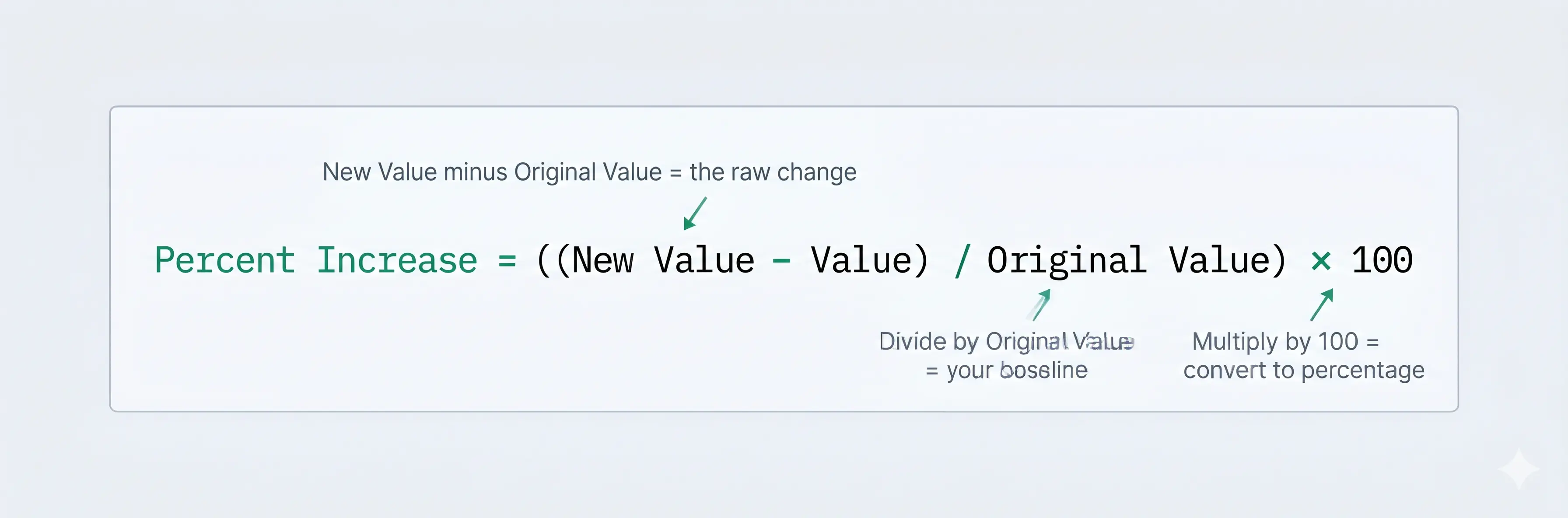
I know. Parentheses look scary. But really, it is just three small steps stacked together. Let me break it down piece by piece.
First part: New Value minus Original Value. That gives you the raw difference. The actual change. $10 more. 50 more points. Whatever it is.
Second part: Divide by Original Value. This is where people get confused. Why the original? Why not the new number? Because you are measuring growth from where you started. The original is your baseline. Your starting line. If you divide by the new number, you are answering a different question: "What fraction of the new number came from growth?" That is not the same thing. Trust me on this. Divide by the original.
Third part: Multiply by 100. This just turns your decimal into a percentage. 0.25 becomes 25%. That is all.
Step-by-Step Breakdown
Here is the same thing as a simple numbered list.
- Subtract the original value from the new value.
- Divide that answer by the original value.
- Multiply that answer by 100.
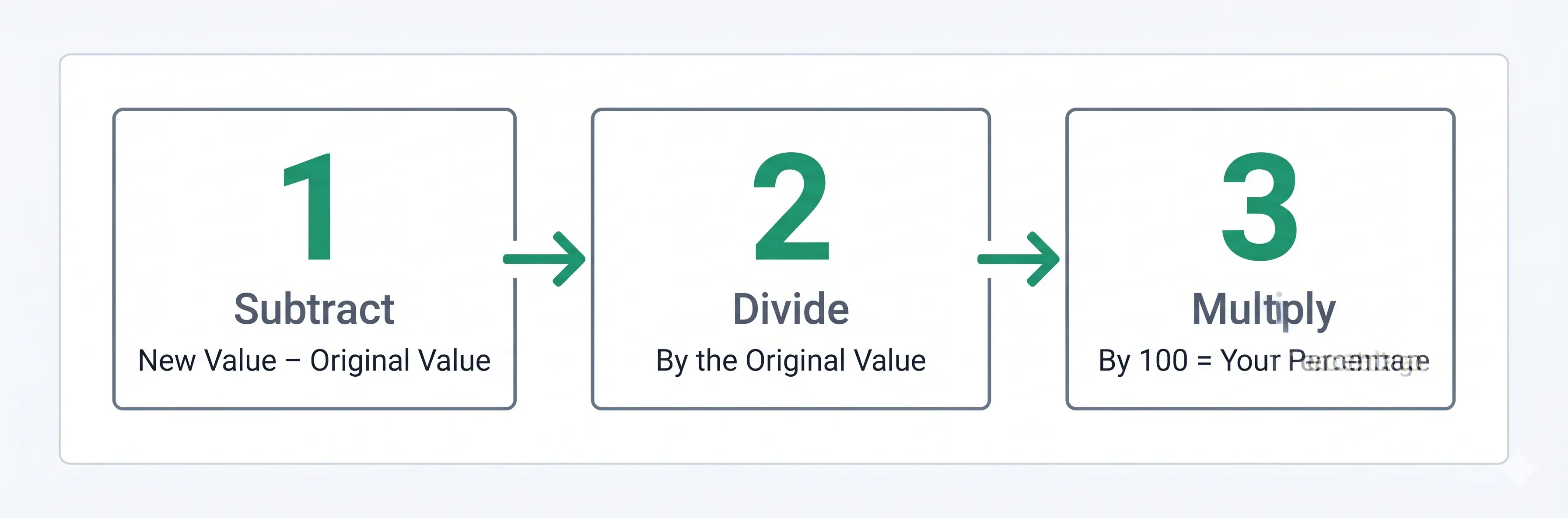
That is it. Three steps. No magic. No hidden tricks. If you learn better by watching, Khan Academy has a free video walkthrough of percentage change.
The Percentage Increase Formula Explained
The Formula
Okay, now let me show you the formula. But I will not just throw it at you. I will walk through each piece slowly.
I know. Parentheses look scary. But really, it is just three small steps stacked together. Let me break it down piece by piece.
First part: New Value minus Original Value. That gives you the raw difference. The actual change. $10 more. 50 more points. Whatever it is.
Second part: Divide by Original Value. This is where people get confused. Why the original? Why not the new number? Because you are measuring growth from where you started. The original is your baseline. Your starting line. If you divide by the new number, you are answering a different question: "What fraction of the new number came from growth?" That is not the same thing. Trust me on this. Divide by the original.
Third part: Multiply by 100. This just turns your decimal into a percentage. 0.25 becomes 25%. That is all.
Step-by-Step Breakdown
Here is the same thing as a simple numbered list.
- Subtract the original value from the new value.
- Divide that answer by the original value.
- Multiply that answer by 100.
That is it. Three steps. No magic. No hidden tricks. If you learn better by watching, Khan Academy has a free video walkthrough of percentage change.
Worked Examples — Step by Step
Now let me show you four real examples. I will walk through each one the same way. Slow. Clear. No skipping steps.
Example 1 — Salary Raise
This is the one most people care about. If you want to know how to calculate percentage raise on salary, this is your example.
The situation: You made $45,000 last year. You got a promotion. Now you make $54,000. You want to know what percentage raise you actually got.
The numbers: Original = 45,000, New = 54,000.
- Step one — subtract: 54,000 − 45,000 = 9,000. That is your raise in dollars. Nice.
- Step two — divide: 9,000 / 45,000 = 0.2. This is the fraction of your original salary that the raise represents.
- Step three — multiply by 100: 0.2 × 100 = 20%.
The answer: You got a 20% raise. Now you know. And you can compare that to other job offers or inflation or whatever matters to you.
Example 2 — Product Price Increase
This happens to all of us. If you need to know how to find percentage increase in price, here is a real example.
The situation: You have been wearing a pair of sneakers. Last week they cost $80. This week they cost $96. You want to know how much they went up in percentage terms.
The numbers: Original = 80, New = 96.
- Step one — subtract: 96 − 80 = 16. That is the price hike in dollars.
- Step two — divide: 16 / 80 = 0.2.
- Step three — multiply by 100: 0.2 × 100 = 20%.
The answer: The sneakers went up by 20%. Now you can decide if you still want to buy them.
Example 3 — Business Revenue Growth
This one is for small business owners or freelancers. Here is how to calculate month over month revenue growth percentage in three steps.
The situation: You run a small bakery. In March, you made $12,000. In April, you made $15,600. You want to know your month‑over‑month growth rate.
The numbers: Original = 12,000, New = 15,600.
- Step one — subtract: 15,600 − 12,000 = 3,600.
- Step two — divide: 3,600 / 12,000 = 0.3.
- Step three — multiply by 100: 0.3 × 100 = 30%.
The answer: Your revenue grew by 30% from March to April. That is a strong number. Now you can put it in a report or show it to a partner.
Example 4 — Exam Score Improvement
This one is for students or parents. Here is how to calculate percentage improvement in test scores the right way.
The situation: A student scores 65 on their first practice exam. After studying, they score 78. They want to know how much they improved in percentage terms.
The numbers: Original = 65, New = 78.
- Step one — subtract: 78 − 65 = 13.
- Step two — divide: 13 / 65 = 0.2.
- Step three — multiply by 100: 0.2 × 100 = 20%.
The answer: The student improved by 20%. That is real progress. And now they can see it as a percentage, not just a 13‑point bump.
Real-Life Uses of Percentage Increase
You probably need this more often than you realize. Let me walk through five common situations.
Finance and Investments
You bought a stock at $50 per share. Now it is $60. That is a 20% increase. Your friend bought a different stock at $100 per share. Now it is $115. That is only a 15% increase. If you want to know how to compare investment returns using percentage increase, this is exactly how. Percentages let you compare these fairly. Without percentages, you might think your friend made more money because $15 is bigger than $10. But in reality, your investment performed better. Percentages tell the truth.
Salary and Pay Negotiations
Someone offers you a $5,000 raise. You cannot tell if that is good until you know your current salary. Knowing how to evaluate a salary raise offer using percentage changes everything. At $40,000, that is a 12.5% raise — solid. At $80,000, that is only a 6.25% raise. At $120,000, that is about a 4.2% raise, which might not even keep up with inflation. Always ask for the percentage. Or calculate it yourself. To see real-world salary increase averages by industry, check the Bureau of Labor Statistics.
Retail and Shopping
A $0.50 price increase on a $2 loaf of bread is a 25% jump. That hurts your wallet. A $0.50 price increase on a $50 jacket is only a 1% bump. You barely notice. Same fifty cents. Completely different effect. Percentage increase explains why.
Business Performance
You grew from 100 customers to 120 customers. That is a 20% increase. You grew from 1,000 customers to 1,100 customers. That is a 10% increase. Understanding how to measure business growth rate with percentage increase matters here — without percentages, you might think the second one is better because you added 100 customers instead of 20. But the first one is actually stronger growth relative to where you started.
Health and Fitness
You used to lift 100 pounds. Now you lift 120 pounds. That is a 20% increase. Strong progress. You used to weigh 200 pounds. Now you weigh 180 pounds. That is a 10% decrease — the same formula, just in reverse. Percentages help you track progress without obsessing over every single pound or pound.
Percentage Increase vs Percentage Change vs Percentage Difference
People mix these up constantly. I do not blame you. They sound similar. Let me clear it up once and for all. Understanding the difference between percentage increase and percentage change is simpler than it looks.
Percentage increase is only for situations where the number actually went up. It always uses the original value as the baseline. The formula is ((New − Original) / Original) × 100, and the result is always positive.
Percentage change works for both increases and decreases. It uses the same exact formula. If the result is negative, things go down. If the result is positive, things go up.
Percentage difference is used when there is no clear "original" or "new" — for example, comparing two prices from two different stores. It uses the average of both numbers as the baseline and is never negative because it uses absolute value.
Here is a concrete example. A price drops from $100 to $80.
- Percentage increase? Not applicable. Nothing increased.
- Percentage change? −20%. The negative sign means decrease.
- Percentage difference? About 22.2%, because there is no "before" and "after" — just two numbers.
If you need the decrease version specifically, use the Percent Decrease Calculator. That tool is built for drops.
How to Calculate Percentage Increase Over Time
What if you want to measure growth over several years? Or multiple months? If you need to know how to calculate percentage increase over multiple months, the standard formula works fine for two points in time. For example, your revenue went from $10,000 in January to $15,000 in December. Plug it in: (15,000 − 10,000) / 10,000 × 100 = 50%. That is a 50% increase for the whole year.
But here is where people get confused. That 50% does not mean you grew 4.16% each month. Growth compounds. It piles on top of itself. A 50% yearly increase could mean 10% one month, 5% another month, 15% another month. There is no single monthly number that gets you there evenly unless you do more advanced math.
So when should you use the standard formula?
- When you have exactly two numbers — start and end.
- When you want total growth over that entire period.
- When you do not care about what happened in between.
If you need average growth per month or per year, you are looking for something called CAGR (compound annual growth rate) — and understanding the difference between percentage increase over time vs compound annual growth rate is worth knowing. That is a different topic for another day. For everyday needs — salary comparisons, price checks, score improvements — the standard percentage increase formula is exactly what you need.
Common Mistakes When Calculating Percentage Increase
I have seen these mistakes more times than I can count. Maybe you have made one or two yourself. That is fine. Now you will know how to avoid them.
Mistake 1 — Dividing by the new value instead of the original
This is the most common mistake when calculating percentage increase — by far. It happens because the new number feels like the "after" snapshot. It feels important. It feels like the right baseline. But it is wrong.
- The wrong way: (50 − 40) / 50 = 20%.
- The right way: (50 − 40) / 40 = 25%.
See the difference? 5 percentage points off. That matters.
Mistake 2 — Forgetting to multiply by 100
You do all the subtraction. You do the division. You get 0.25. And you stop. But 0.25 is not a percentage. It is a decimal. It means "25 hundredths." Multiply by 100. Get 25%. That is a percentage.
Mistake 3 — Confusing percentage increase with percentage points
An interest rate goes from 2% to 3%. That is an increase of 1 percentage point. That is a simple subtraction. But the percentage increase is 50%, because (3 − 2) / 2 × 100 = 50%. Both are correct. They just answer different questions.
The difference between percentage increase and percentage points trips people up constantly. If someone says "rates went up by 1%," ask them: "One percentage point or one percent?" They are not the same.
Mistake 4 — Subtracting in the wrong order
Always do new minus original. If you do original minus new, you will get a negative number even when things went up.
- The right order: 50 − 40 = +10.
- The wrong order: 40 − 50 = −10.
The wrong order gives you a negative. Then you divide. Then you get a negative percentage. That makes no sense for an increase.
Tips for Using This Calculator Effectively
Using the tool is simple, but knowing these tips for using a percentage increase calculator correctly makes it foolproof.
What to enter in each field
The original value is your starting number — the old price, your previous salary, last month's revenue. The new value is your ending number — the current price, your new salary, this month's revenue. Enter them exactly in that order.
The calculator is designed around the original first, new second.
What happens if the new value is lower?
The calculator detects when the new value is smaller than the original. Instead of giving a negative result (which would be a percentage decrease), it will prompt you to use the Percent Decrease Calculator. That tool is designed specifically for drops, not increases.
When to use related calculators
Knowing when to use the Percent Decrease Calculator instead of Percent Increase saves you from wrong results. Use the Percent Decrease Calculator when the new value is lower than the original. Use the Scale Calculator when you need to resize numbers proportionally, not just measure growth.
Decimal values work fine
The calculator accepts decimals. If you are working with 15.5 and 22.75, just type them in. The tool handles the math and rounds to two decimal places automatically.
FAQ — Frequently Asked Questions
What is the formula for percentage increase?
((New Value − Original Value) / Original Value) × 100. Subtract the original from the new. Divide by the original. Multiply by 100.
How do I calculate a 20% increase on a number?
Multiply the original number by 1.20. A 20% increase means you keep the original (100%) and add 20%. So 120% total. 120% as a decimal is 1.20. Example: 50 × 1.20 = 60.
What is the difference between percentage increase and percentage change?
Percentage increase only applies when numbers go up. Percentage change applies to both increases and decreases. The formula is the same. The only difference is that percentage change can be negative.
Why do we divide by the original value and not the new value?
Because percentage increase measures growth from where you started. The original is your baseline. Dividing by the new number answers a different question: "What fraction of the new number came from growth?" That is not the same thing.
What if my result is negative — does that mean there was a decrease?
Yes. A negative result means the new value is smaller than the original. That is a percentage decrease, not an increase. Use the Percent Decrease Calculator for those situations. If you want to know who built these tools and why, visit the About Us page.
Can I use this calculator for salary increases?
Absolutely. Put your old salary as the original value. Put your new salary as the new value. The calculator will show your exact percentage raise.
Conclusion
Percentage increase is not complicated. It is just a way to measure growth against where you started. Three steps: subtract the original from the new, divide by the original, multiply by 100. That is the whole thing. The examples in this guide cover most situations you will run into — salaries, prices, revenue, test scores, investments, fitness progress.
The calculator at the top of this page does the work for you. Enter your two numbers. Click calculate. Get your answer instantly. No manual math required.
If you need to measure a drop instead of a rise, check out the Percent Decrease Calculator. If you need to resize numbers proportionally — like scaling a recipe or a drawing — try Scale Calculator. Otherwise, bookmark this page. You will probably need it again. Everyone does.